提示生成界面工具横评:v0、Lovable、Bolt、Figma Make、Magic Patterns提示產生介面工具橫評:v0、Lovable、Bolt、Figma Make、Magic PatternsPrompt-to-UI tools compared: v0, Lovable, Bolt, Figma Make, Magic PatternsプロンプトUIツール比較:v0・Lovable・Bolt・Figma Make・Magic Patterns프롬프트-UI 도구 비교: v0, Lovable, Bolt, Figma Make, Magic PatternsPerbandingan alat prompt-ke-UISo sánh công cụ prompt-to-UI: v0, Lovable, Bolt, Figma Make, Magic PatternsComparatif des outils prompt-to-UIComparativa de herramientas prompt-to-UIPrompt-to-UI-Tools im Vergleich
不是排行榜,而是决策指南:按你要交付什么、产出放在哪里、需要多少设计控制来选。不是排行榜,而是決策指南:按你要交付什麼、產出放在哪裡、需要多少設計控制來選。Not a leaderboard: a decision guide by what you are shipping, where the output lives, and how much design control you need.ランキングではなく判断ガイド:何を出すか、成果物の置き場所、必要なデザイン制御で選ぶ。순위표가 아닌 결정 가이드: 무엇을 출시하는지, 산출물 위치, 필요한 디자인 통제로 고르자.Bukan senarai kedudukan: panduan memilih mengikut apa yang dihantar dan kawalan reka bentuk.Không phải bảng xếp hạng: hướng dẫn chọn theo thứ bạn giao, nơi đặt sản phẩm và mức kiểm soát thiết kế.Pas un classement : un guide de choix selon le livrable, l'emplacement du code et le contrôle du design.No es un ranking: una guía según lo que entregas, dónde vive el resultado y el control de diseño.Kein Ranking: eine Entscheidungshilfe nach Ergebnis, Ablageort und Designkontrolle.
正文以簡體中文顯示。
本文は英語で表示しています。
본문은 영어로 표시됩니다.
Kandungan dipaparkan dalam bahasa Inggeris.
Nội dung hiển thị bằng tiếng Anh.
Le corps de l’article est en anglais.
El cuerpo del artículo está en inglés.
Der Beitragstext ist auf Englisch.
All five tools turn words into interface, but they are built for different jobs. Comparing them on "which looks best" is unreliable because output depends mostly on your prompt. Compare them on what they produce and where it goes.
By deliverable
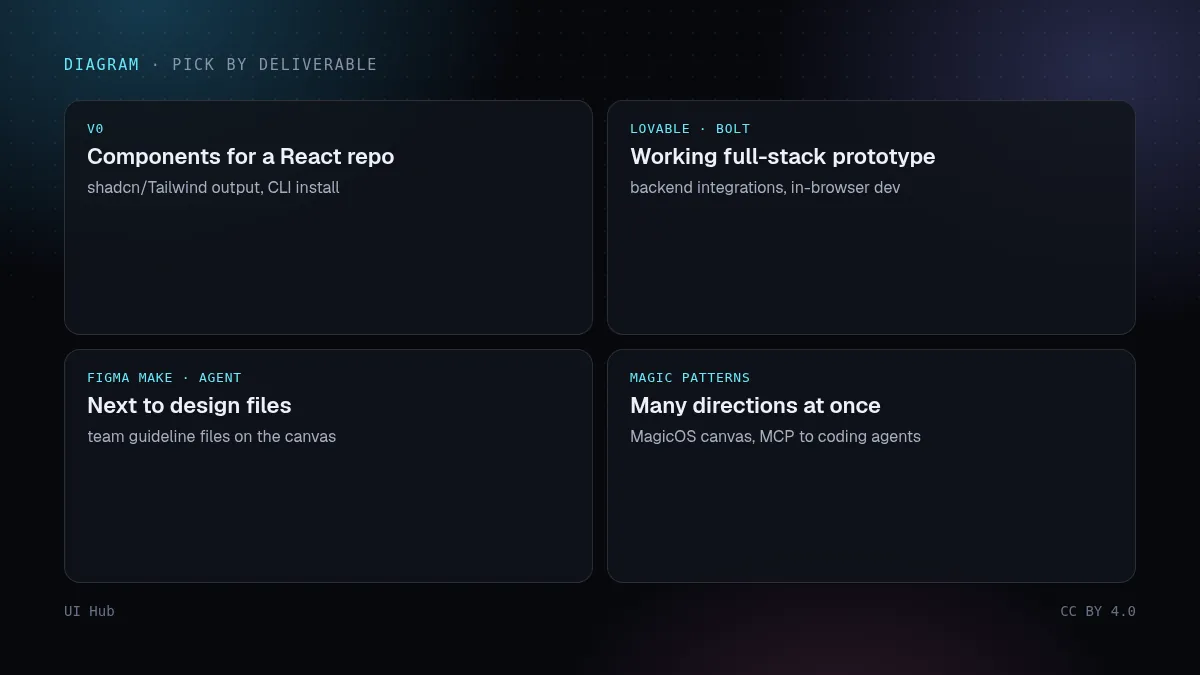
- Components for an existing React codebase: v0 (shadcn/Tailwind output, CLI install).
- A working full-stack prototype: Lovable or Bolt (backend integrations, in-browser dev env for Bolt).
- Prototypes next to your design files: Figma Make; the Figma agent for edits on the canvas with team guidelines.
- Product-team exploration across many directions: Magic Patterns, now with the MagicOS canvas and an MCP server for coding agents.
Questions that decide it
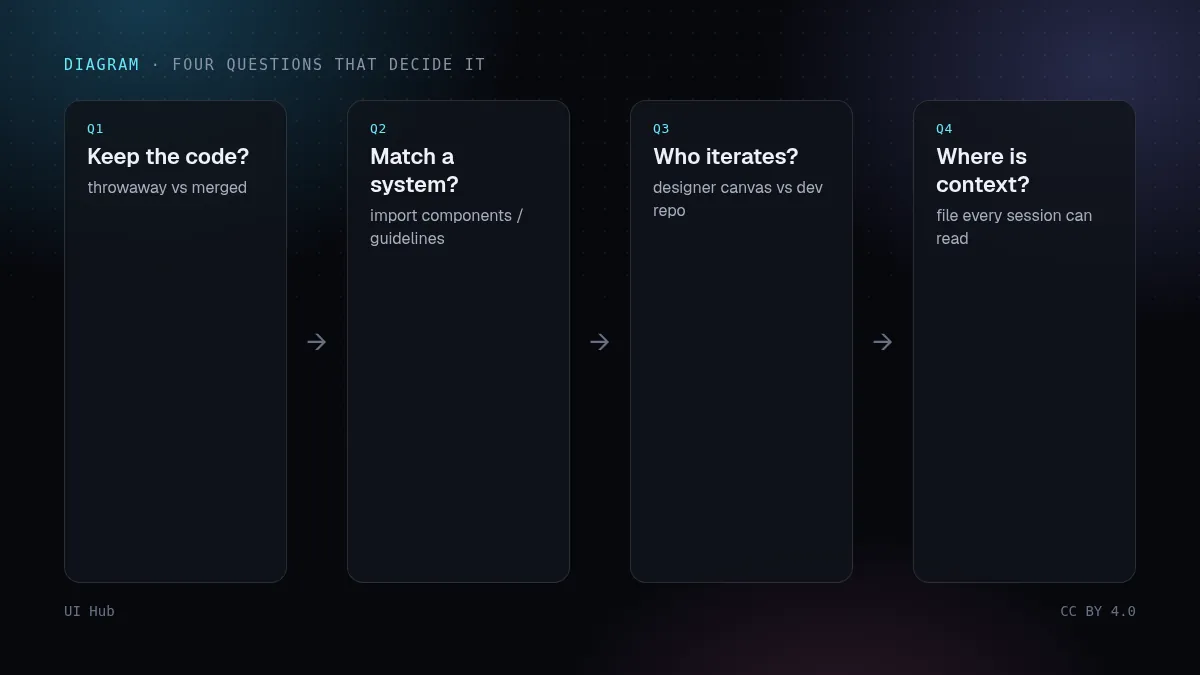
- Will engineers keep the code, or is this throwaway?
- Do you need to match an existing design system? (Check whether the tool can import components or guideline files.)
- Who iterates: a designer on a canvas, or a developer in a repo?
- Where does the design context live, and can every teammate's session read it?
Our take
The 2026 trend across all five is the same: durable context (guideline files, design systems, MCP) beats clever prompting. Pick the tool whose context mechanism fits your team, and invest in that file. Pricing and limits change often, so check each vendor's current page rather than any comparison table, including ours.
五个工具都能把文字变成界面,但它们是为不同的活设计的。比「谁生成得好看」并不可靠,因为效果主要取决于你的提示。应该比它们产出什么、产出去哪里。
按交付物选
- 给现有 React 代码库的组件:v0(产出 shadcn/Tailwind 代码,可用 CLI 安装)。
- 能跑的全栈原型:Lovable 或 Bolt(有后端集成,Bolt 在浏览器里跑开发环境)。
- 紧挨设计稿的原型:Figma Make;要在画布上按团队规范修改,用 Figma 智能体。
- 产品团队多方向探索:Magic Patterns,现在有 MagicOS 画布和给编程智能体用的 MCP 服务。
决定选择的几个问题
- 工程师会保留这些代码,还是用完即弃?
- 需要匹配现有设计系统吗?(看工具能否导入组件或规范文件。)
- 谁来迭代:画布上的设计师,还是仓库里的开发者?
- 设计上下文放在哪里,每个队友的会话都能读到吗?
我们的看法
2026 年这五个工具的趋势一致:持久的上下文(规范文件、设计系统、MCP)比花哨的提示词更重要。选上下文机制最适合你团队的那个,然后把功夫花在那份文件上。价格和额度经常变,请以各家当前官网为准,任何对比表(包括我们这张)都不如官网可靠。
All five tools turn words into interface, but they are built for different jobs. Comparing them on "which looks best" is unreliable because output depends mostly on your prompt. Compare them on what they produce and where it goes.
By deliverable
- Components for an existing React codebase: v0 (shadcn/Tailwind output, CLI install).
- A working full-stack prototype: Lovable or Bolt (backend integrations, in-browser dev env for Bolt).
- Prototypes next to your design files: Figma Make; the Figma agent for edits on the canvas with team guidelines.
- Product-team exploration across many directions: Magic Patterns, now with the MagicOS canvas and an MCP server for coding agents.
Questions that decide it
- Will engineers keep the code, or is this throwaway?
- Do you need to match an existing design system? (Check whether the tool can import components or guideline files.)
- Who iterates: a designer on a canvas, or a developer in a repo?
- Where does the design context live, and can every teammate's session read it?
Our take
The 2026 trend across all five is the same: durable context (guideline files, design systems, MCP) beats clever prompting. Pick the tool whose context mechanism fits your team, and invest in that file. Pricing and limits change often, so check each vendor's current page rather than any comparison table, including ours.
AI 提示词AI 提示詞AI promptAIプロンプトAI 프롬프트Prompt AIPrompt cho AIPrompt IAPrompt de IAKI-Prompt
复制给 Claude、Cursor、v0 等 AI 助手,让它按本文的方法处理你的项目。尖括号里的内容换成你自己的。複製給 Claude、Cursor、v0 等 AI 助手,讓它按本文的方法處理你的專案。尖括號裡的內容換成你自己的。Paste this into Claude, Cursor, v0 or another assistant to apply this post to your own project. Replace the parts in angle brackets.Claude・Cursor・v0 などのAIアシスタントに貼り付けると、この記事の方法をあなたのプロジェクトに適用できます。山括弧の部分は自分の内容に置き換えてください。Claude, Cursor, v0 같은 AI 도우미에 붙여 넣으면 이 글의 방법을 내 프로젝트에 적용할 수 있습니다. 꺾쇠괄호 안은 내 내용으로 바꾸세요.Tampal ke Claude, Cursor, v0 atau pembantu lain untuk menggunakan kaedah artikel ini pada projek anda. Gantikan bahagian dalam kurungan sudut.Dán vào Claude, Cursor, v0 hoặc trợ lý khác để áp dụng bài này cho dự án của bạn. Thay phần trong dấu ngoặc nhọn bằng nội dung của bạn.Collez-le dans Claude, Cursor, v0 ou un autre assistant pour appliquer cet article à votre projet. Remplacez les parties entre chevrons.Pégalo en Claude, Cursor, v0 u otro asistente para aplicar este artículo a tu proyecto. Sustituye lo que está entre corchetes angulares.In Claude, Cursor, v0 oder einen anderen Assistenten einfügen, um diesen Beitrag auf dein Projekt anzuwenden. Teile in spitzen Klammern ersetzen.
你是一名资深 UI 工程师。请把文章《提示生成界面工具横评:v0、Lovable、Bolt、Figma Make、Magic Patterns》(https://ui.incidental.site/blog/prompt-to-ui-tools-compared/)的方法用到我的项目上。
核心观点:不是排行榜,而是决策指南:按你要交付什么、产出放在哪里、需要多少设计控制来选。
步骤:
1. 读文章,把建议整理成一份具体、可检查的编号清单。
2. 用这份清单检查 <我的页面 / 组件 / 仓库>,每条标注通过或不通过,并写明文件和行号。
3. 用我现有的 token 和组件,小批量修复不通过的项。不要编造 API,以文章链接的官方文档为准。
4. 最后列出待确认的问题和你无法核实的内容。
你是一名資深 UI 工程師。請把文章《提示產生介面工具橫評:v0、Lovable、Bolt、Figma Make、Magic Patterns》(https://ui.incidental.site/blog/prompt-to-ui-tools-compared/)的方法用到我的專案上。
核心觀點:不是排行榜,而是決策指南:按你要交付什麼、產出放在哪裡、需要多少設計控制來選。
步驟:
1. 讀文章,把建議整理成一份具體、可檢查的編號清單。
2. 用這份清單檢查 <我的頁面 / 元件 / 儲存庫>,每條標註通過或不通過,並寫明檔案和行號。
3. 用我現有的 token 和元件,小批量修復不通過的項目。不要編造 API,以文章連結的官方文件為準。
4. 最後列出待確認的問題和你無法核實的內容。You are a senior UI engineer. Apply the article “Prompt-to-UI tools compared: v0, Lovable, Bolt, Figma Make, Magic Patterns” (https://ui.incidental.site/blog/prompt-to-ui-tools-compared/) to my project.
Key idea: Not a leaderboard: a decision guide by what you are shipping, where the output lives, and how much design control you need.
Steps:
1. Read the article and turn its advice into a numbered checklist of concrete, checkable rules.
2. Audit <my page / component / repo> against that checklist; mark each rule PASS or FAIL with file and line.
3. Fix the FAIL items in small batches, using my existing tokens and components. Do not invent APIs; follow the official docs the article links to.
4. Finish with a short list of open questions and anything you could not verify.あなたはシニアUIエンジニアです。記事「プロンプトUIツール比較:v0・Lovable・Bolt・Figma Make・Magic Patterns」(https://ui.incidental.site/blog/prompt-to-ui-tools-compared/)の方法を私のプロジェクトに適用してください。
要点:ランキングではなく判断ガイド:何を出すか、成果物の置き場所、必要なデザイン制御で選ぶ。
手順:
1. 記事を読み、助言を具体的で確認可能な番号付きチェックリストにする。
2. そのチェックリストで <私のページ / コンポーネント / リポジトリ> を監査し、各項目を合格/不合格で示し、ファイルと行番号を書く。
3. 不合格の項目を、既存のトークンとコンポーネントを使って少しずつ修正する。APIを捏造せず、記事がリンクする公式ドキュメントに従う。
4. 最後に未解決の質問と検証できなかった点を挙げる。당신은 시니어 UI 엔지니어입니다. 글 “프롬프트-UI 도구 비교: v0, Lovable, Bolt, Figma Make, Magic Patterns”(https://ui.incidental.site/blog/prompt-to-ui-tools-compared/)의 방법을 내 프로젝트에 적용해 주세요.
핵심: 순위표가 아닌 결정 가이드: 무엇을 출시하는지, 산출물 위치, 필요한 디자인 통제로 고르자.
단계:
1. 글을 읽고 조언을 구체적이고 확인 가능한 번호 목록으로 정리한다.
2. 그 목록으로 <내 페이지 / 컴포넌트 / 저장소>를 점검하고, 항목마다 통과/실패와 파일·줄 번호를 적는다.
3. 실패 항목을 기존 토큰과 컴포넌트로 조금씩 고친다. API를 지어내지 말고 글에 링크된 공식 문서를 따른다.
4. 마지막으로 남은 질문과 확인하지 못한 내용을 정리한다.Anda jurutera UI kanan. Gunakan kaedah artikel “Perbandingan alat prompt-ke-UI” (https://ui.incidental.site/blog/prompt-to-ui-tools-compared/) pada projek saya.
Idea utama: Bukan senarai kedudukan: panduan memilih mengikut apa yang dihantar dan kawalan reka bentuk.
Langkah:
1. Baca artikel dan jadikan nasihatnya senarai semak bernombor yang konkrit dan boleh disemak.
2. Audit <halaman / komponen / repo saya> dengan senarai itu; tandakan setiap peraturan LULUS atau GAGAL dengan fail dan baris.
3. Baiki item GAGAL sedikit demi sedikit menggunakan token dan komponen sedia ada. Jangan reka API; ikut dokumen rasmi yang dipautkan artikel.
4. Akhiri dengan soalan terbuka dan perkara yang tidak dapat disahkan.Bạn là kỹ sư UI cấp cao. Hãy áp dụng bài viết “So sánh công cụ prompt-to-UI: v0, Lovable, Bolt, Figma Make, Magic Patterns” (https://ui.incidental.site/blog/prompt-to-ui-tools-compared/) cho dự án của tôi.
Ý chính: Không phải bảng xếp hạng: hướng dẫn chọn theo thứ bạn giao, nơi đặt sản phẩm và mức kiểm soát thiết kế.
Các bước:
1. Đọc bài và biến lời khuyên thành danh sách kiểm tra đánh số, cụ thể, kiểm chứng được.
2. Rà soát <trang / component / repo của tôi> theo danh sách đó; ghi ĐẠT hoặc KHÔNG ĐẠT kèm tệp và dòng.
3. Sửa các mục KHÔNG ĐẠT theo từng đợt nhỏ, dùng token và component sẵn có. Không bịa API; làm theo tài liệu chính thức mà bài viết dẫn tới.
4. Kết thúc bằng các câu hỏi còn mở và những điểm chưa xác minh được.Tu es ingénieur UI senior. Applique l’article « Comparatif des outils prompt-to-UI » (https://ui.incidental.site/blog/prompt-to-ui-tools-compared/) à mon projet.
Idée clé : Pas un classement : un guide de choix selon le livrable, l'emplacement du code et le contrôle du design.
Étapes :
1. Lis l’article et transforme ses conseils en une liste numérotée de règles concrètes et vérifiables.
2. Audite <ma page / mon composant / mon dépôt> avec cette liste ; indique OK ou KO pour chaque règle, avec fichier et ligne.
3. Corrige les points KO par petits lots, avec mes tokens et composants existants. N’invente pas d’API ; suis la documentation officielle citée par l’article.
4. Termine par les questions ouvertes et ce que tu n’as pas pu vérifier.Eres un ingeniero de UI sénior. Aplica el artículo “Comparativa de herramientas prompt-to-UI” (https://ui.incidental.site/blog/prompt-to-ui-tools-compared/) a mi proyecto.
Idea clave: No es un ranking: una guía según lo que entregas, dónde vive el resultado y el control de diseño.
Pasos:
1. Lee el artículo y convierte sus consejos en una lista numerada de reglas concretas y comprobables.
2. Audita <mi página / componente / repositorio> con esa lista; marca cada regla como CUMPLE o NO CUMPLE con archivo y línea.
3. Corrige los puntos que no cumplen en lotes pequeños, usando mis tokens y componentes actuales. No inventes APIs; sigue la documentación oficial que enlaza el artículo.
4. Termina con las preguntas abiertas y lo que no pudiste verificar.Du bist Senior-UI-Engineer. Wende den Artikel „Prompt-to-UI-Tools im Vergleich“ (https://ui.incidental.site/blog/prompt-to-ui-tools-compared/) auf mein Projekt an.
Kernidee: Kein Ranking: eine Entscheidungshilfe nach Ergebnis, Ablageort und Designkontrolle.
Schritte:
1. Lies den Artikel und mach aus den Empfehlungen eine nummerierte Liste konkreter, prüfbarer Regeln.
2. Prüfe <meine Seite / Komponente / mein Repo> anhand dieser Liste; markiere jede Regel mit OK oder FEHLT, mit Datei und Zeile.
3. Behebe die fehlenden Punkte in kleinen Schritten mit meinen vorhandenen Tokens und Komponenten. Erfinde keine APIs; folge der offiziellen Doku, die der Artikel verlinkt.
4. Schließe mit offenen Fragen und dem, was du nicht prüfen konntest.引用来源引用來源References参考文献참고 자료RujukanNguồn tham khảoRéférencesReferenciasQuellen
- v0 — Vercel
- Lovable docs — Lovable
- Bolt.new — StackBlitz (含推荐链接含推薦連結Referral link紹介リンクを含みます추천 링크 포함Mengandungi pautan rujukanCó liên kết giới thiệuLien de parrainageEnlace de referidoEmpfehlungslink)
- Figma Make — Figma
- Magic Patterns — Magic Patterns
相关文章相關文章Related posts関連記事관련 글Artikel berkaitanBài liên quanArticles liésArtículos relacionadosÄhnliche Beiträge
Lovable 与 Bolt:当「提示生成界面」变成「提示生成应用」Lovable 與 Bolt:當「提示產生介面」變成「提示產生應用」Lovable and Bolt: when prompt-to-UI becomes prompt-to-appLovableとBolt:プロンプトからUIがアプリになるときLovable과 Bolt: 프롬프트-UI가 프롬프트-앱이 될 때Lovable dan Bolt: apabila prompt-ke-UI menjadi prompt-ke-aplLovable và Bolt: khi prompt-to-UI thành prompt-to-appLovable et Bolt : quand le prompt-to-UI devient prompt-to-appLovable y Bolt: cuando prompt-to-UI se vuelve prompt-to-appLovable und Bolt: wenn Prompt-to-UI zu Prompt-to-App wird
两者都能生成完整应用,于是设计质量要和数据、登录、部署抢注意力。如何不让视觉沦为事后补丁。兩者都能產生完整應用,於是設計品質要和資料、登入、部署搶注意力。如何不讓視覺淪為事後補丁。Both tools build whole apps, so design quality now competes with data, auth and deploys for attention. How to keep the look from being an afterthought.どちらもアプリ全体を作るため、デザイン品質はデータや認証と注意を奪い合う。見た目を後回しにしない方法。둘 다 앱 전체를 만들기에 디자인 품질이 데이터·인증·배포와 경쟁한다. 외관을 뒷전으로 두지 않는 법.Kedua-duanya membina apl penuh; reka bentuk bersaing dengan data dan auth. Cara elak visual jadi hal kemudian.Cả hai dựng app hoàn chỉnh nên thiết kế phải tranh chú ý với dữ liệu, đăng nhập. Cách để giao diện không bị bỏ quên.Les deux construisent des apps entières : le design rivalise avec données et auth. Comment ne pas le reléguer.Ambos construyen apps completas: el diseño compite con datos y auth. Cómo evitar que quede para después.Beide bauen ganze Apps – Design konkurriert mit Daten und Auth. So bleibt die Optik keine Nebensache.
v0 实战:从一句提示到能留下来的 shadcn 代码v0 實戰:從一句提示到能留下來的 shadcn 程式碼v0 in practice: from a prompt to shadcn code you can keepv0実践:プロンプトから残せるshadcnコードへv0 실전: 프롬프트에서 남길 수 있는 shadcn 코드까지v0 secara praktikal: dari prompt ke kod shadcn yang boleh disimpanv0 thực chiến: từ một prompt đến mã shadcn giữ lại đượcv0 en pratique : d'un prompt à du code shadcn qu'on gardev0 en la práctica: de un prompt a código shadcn que puedes conservarv0 in der Praxis: vom Prompt zu shadcn-Code, den man behält
v0 最强的用法是把它当 shadcn/Tailwind 代码生成器,而不是设计神谕。像给工程师写需求一样写提示,然后把代码拉进自己的仓库。v0 最強的用法是把它當 shadcn/Tailwind 程式碼產生器,而不是設計神諭。像給工程師寫需求一樣寫提示,再把程式碼拉進自己的倉庫。v0 is strongest when you treat it as a shadcn/Tailwind code generator, not a design oracle. Brief it like an engineer, then pull the code into your repo.v0はデザインの神託ではなくshadcn/Tailwindのコード生成器として使うと最強。エンジニア向けに指示し、コードを自分のリポジトリへ。v0는 디자인 신탁이 아니라 shadcn/Tailwind 코드 생성기로 쓸 때 가장 강하다. 엔지니어에게 하듯 지시하고 코드를 저장소로 가져오자.v0 paling kuat sebagai penjana kod shadcn/Tailwind. Beri arahan seperti kepada jurutera, kemudian bawa kod ke repo anda.v0 mạnh nhất khi coi là trình sinh mã shadcn/Tailwind. Viết yêu cầu như cho kỹ sư rồi kéo mã về repo.v0 brille comme générateur de code shadcn/Tailwind. Briefez-le comme un ingénieur puis rapatriez le code.v0 rinde mejor como generador de código shadcn/Tailwind. Instrúyelo como a un ingeniero y lleva el código a tu repo.v0 glänzt als shadcn/Tailwind-Codegenerator. Briefen Sie es wie einen Engineer und holen Sie den Code ins Repo.
Figma Make 与 Figma 智能体:AI 搬上画布Figma Make 與 Figma 智慧體:AI 搬上畫布Figma Make and the Figma agent: AI moves onto the canvasFigma MakeとFigmaエージェント:AIがキャンバスへFigma Make와 Figma 에이전트: AI가 캔버스로Figma Make dan ejen Figma: AI pindah ke kanvasFigma Make và agent của Figma: AI lên canvasFigma Make et l'agent Figma : l'IA arrive sur le canevasFigma Make y el agente de Figma: la IA llega al lienzoFigma Make und der Figma-Agent: KI zieht auf die Canvas
Figma Make 把提示变成可交互原型;Figma 智能体自 2026-10-06 正式可用,能读取团队规范文件。为什么规范文件才是关键。Figma Make 把提示變成可互動原型;Figma 智慧體自 2026-10-06 正式可用,能讀取團隊規範檔。為什麼規範檔才是關鍵。Figma Make turns prompts into working prototypes; the Figma agent, generally available since 6 Oct 2026, reads team guideline files. Why the guideline file matters most.Figma Makeはプロンプトを動くプロトタイプに。2026/10/6 GAのエージェントはガイドラインを読む。肝はガイドライン。Figma Make는 프롬프트를 프로토타입으로, 2026-10-06 정식 출시된 에이전트는 가이드라인 파일을 읽는다.Figma Make jadikan prompt prototaip; ejen Figma (GA 6 Okt 2026) membaca fail garis panduan pasukan.Figma Make biến prompt thành prototype; agent Figma (GA 6/10/2026) đọc file hướng dẫn của nhóm.Figma Make transforme des prompts en prototypes ; l'agent (GA le 6/10/2026) lit les guides d'équipe.Figma Make convierte prompts en prototipos; el agente (GA 6/10/2026) lee las guías del equipo.Figma Make macht Prompts zu Prototypen; der Agent (GA 6.10.2026) liest Team-Guidelines.