Figma 代码图层与 Specs:画布重新成为共享上下文Figma 程式碼圖層與 Specs:畫布重新成為共享脈絡Figma code layers and Specs: the canvas becomes the shared context againFigmaのコードレイヤーと Specs:キャンバスが再び共有コンテキストにFigma 코드 레이어와 Specs: 캔버스가 다시 공유 컨텍스트가 되다Lapisan kod dan Specs Figma: kanvas kembali menjadi konteks bersamaCode layers và Specs của Figma: canvas lại là ngữ cảnh chungCode layers et Specs dans Figma : le canevas redevient le contexte partagéCode layers y Specs en Figma: el lienzo vuelve a ser el contexto compartidoFigma Code Layers und Specs: Die Canvas wird wieder zum gemeinsamen Kontext
在 Config India(2026-10-15)上,Figma 让代码图层进入公开测试,推出把 Markdown 放上画布的 Specs,并让组件库携带规范与代码源。给界面构建者的结论:智能体缺的不是生成器,而是约束文件。在 Config India(2026-10-15)上,Figma 讓程式碼圖層進入公開測試,推出把 Markdown 放上畫布的 Specs,並讓元件庫攜帶規範與程式碼來源。給介面建構者的結論:智慧體缺的不是產生器,而是約束檔案。At Config India (15 Oct 2026) Figma moved code layers into open beta, launched Specs as a Markdown home on the canvas, and let libraries carry guidelines and code sources. The lesson for UI builders: agents are short of constraint files, not generators.Config India(2026-10-15)でFigmaはコードレイヤーをオープンベータにし、Markdownをキャンバスに置くSpecsを公開、ライブラリにガイドラインとコードソースを持たせた。UI制作者への教訓:エージェントに足りないのは生成器ではなく制約ファイルだ。Config India(2026-10-15)에서 Figma는 코드 레이어를 오픈 베타로 전환하고, Markdown을 캔버스에 두는 Specs를 출시했으며, 라이브러리에 가이드라인과 코드 소스를 붙였다. UI 제작자에게 주는 교훈: 에이전트에게 부족한 것은 생성기가 아니라 제약 파일이다.Di Config India (15 Okt 2026) Figma membawa lapisan kod ke beta terbuka, melancarkan Specs sebagai rumah Markdown di kanvas, dan membenarkan pustaka membawa garis panduan serta sumber kod. Pengajaran: ejen kekurangan fail kekangan, bukan penjana.Tại Config India (15/10/2026), Figma đưa code layers vào beta mở, ra mắt Specs làm nơi đặt Markdown trên canvas, và cho thư viện mang theo guidelines cùng code sources. Bài học: agent thiếu file ràng buộc, không thiếu trình sinh.À Config India (15 oct. 2026), Figma passe les code layers en bêta ouverte, lance Specs pour le Markdown sur le canevas et laisse les bibliothèques porter guidelines et sources de code. Leçon : les agents manquent de fichiers de contraintes, pas de générateurs.En Config India (15 oct 2026) Figma llevó los code layers a beta abierta, lanzó Specs como hogar del Markdown en el lienzo y dejó que las bibliotecas lleven guidelines y fuentes de código. Lección: a los agentes les faltan archivos de restricciones, no generadores.Auf der Config India (15. Okt. 2026) brachte Figma Code Layers in die offene Beta, startete Specs als Markdown-Ort auf der Canvas und ließ Bibliotheken Guidelines und Code-Quellen tragen. Die Lehre: Agenten fehlen Constraint-Dateien, nicht Generatoren.
正文以簡體中文顯示。
本文は英語で表示しています。
본문은 영어로 표시됩니다.
Kandungan dipaparkan dalam bahasa Inggeris.
Nội dung hiển thị bằng tiếng Anh.
Le corps de l’article est en anglais.
El cuerpo del artículo está en inglés.
Der Beitragstext ist auf Englisch.
On 15 October 2026, at Config India in Bengaluru, Figma shipped a set of updates that are easy to read as “more AI features” and more useful to read as a single idea: put the code, the written intent and the design-system rules on the same canvas, so people and agents work from one context instead of five tabs. Dylan Field’s recap post frames the problem bluntly. AI made code cheap, so teams “build to think”, but that vibe-coding loop is usually single-player; one customer is quoted describing it as “fast, fast, fast… then slow”.
What launched
- Code layers, open beta on all plans. A code layer is a running, interactive prototype that sits on the canvas. You can start one from scratch (Code tool or B), convert selected frames with Build selection, clone a connected GitHub repo, upload a local folder, push a prototype in from your coding tool through the Figma MCP server, or capture a live page with the Chrome extension. Teammates can duplicate a layer to try another direction, comment and annotate it, edit the code, ask the agent to merge the best parts of two versions, pull screens back out with Extract designs, and push to a branch and open a pull request.
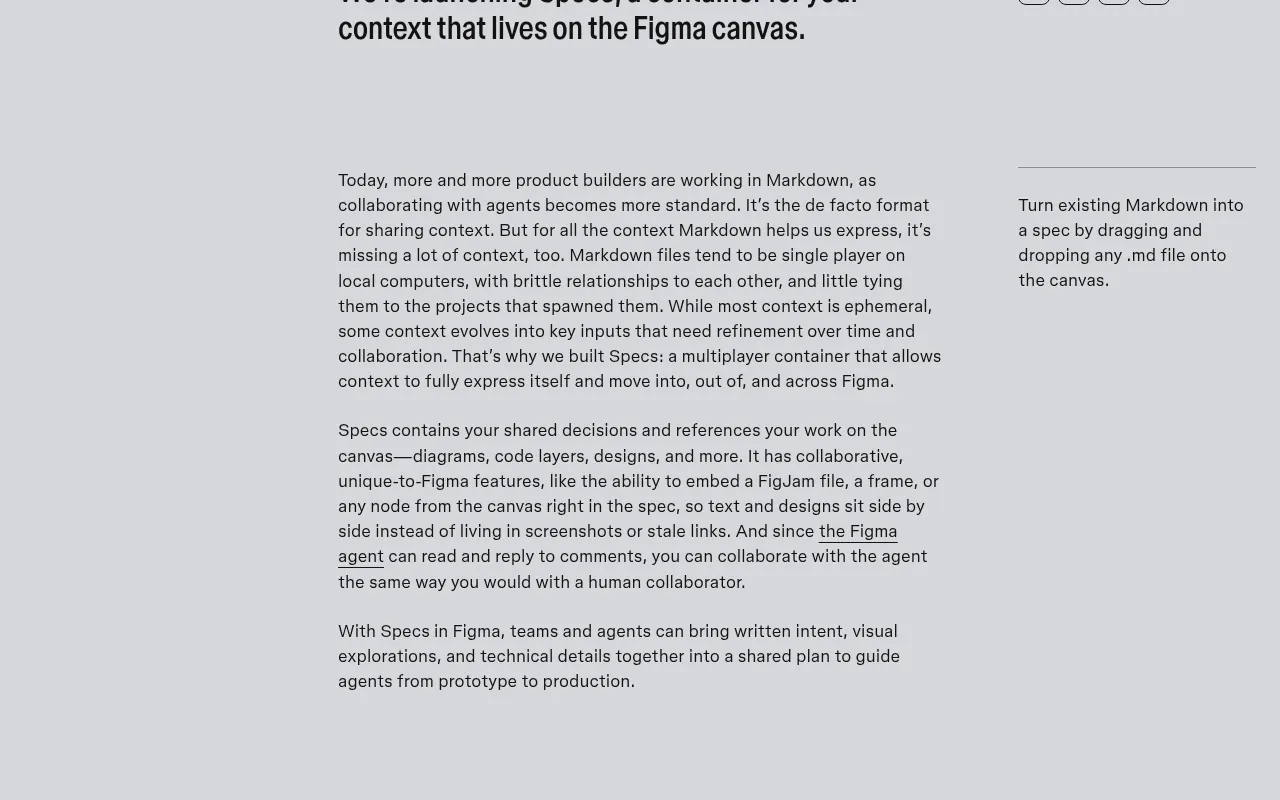
- Specs, open beta on paid plans. A multiplayer Markdown container that lives as its own file or next to designs in Figma Design and FigJam (press D, or drop any
.mdfile on the canvas). A spec can embed frames, FigJam boards and other canvas nodes, the Figma agent can read and reply to comments, and connectors such as GitHub and Hex can pull outside context in. Paste a spec link into a coding agent’s prompt and, according to Figma, the Markdown, frame references, diagrams, code layers and Code Connect snippets travel with it. - Design systems that carry rules and code. Guidelines attached to published libraries (open beta, Professional and above) are handed to the agent automatically whenever someone builds with that library. Code sources (closed beta) attach a GitHub repo or npm package to a library so code layers pull from real components. A centralised design-system space with a system map and a “system check” for gaps such as missing descriptions or interactive states is preview only.
- Figma MCP. Figma says the server is now faster and uses fewer tokens; it can create code layers, read and write Specs, generate images and run Weave workflows, and adds tools such as
html_to_figmaandgenerate_image, plus 20 new partner integrations (OpenCode, Dia, Junie, Meta Muse and others). - Payload in Figma Make. Make now scaffolds a Payload backend (CMS, database, auth, APIs, admin panel) as its native backend; Supabase stays available as a third-party connection.
Why it matters: three shifts
Prototypes go back to multiplayer. The real cost of coding-agent prototypes has not been generation; it has been review. A link to a running demo shows the result but hides the alternatives and the reasoning. Putting several running versions side by side on a canvas, with comments pinned to them, restores the critique loop design teams already know. The branch-and-PR exit matters too: the prototype has a route into the repo rather than being rebuilt.
Markdown finally gets an address. Most teams working with agents already keep PRDs, AGENTS.md files and prompt notes in Markdown, scattered across laptops and repos with no link to the screens they describe. Specs is Figma’s bet that the brief should sit beside the frames, be editable by both humans and agents, and be passable to a coding agent by URL. Whether or not you adopt Specs, the pattern is right: one canonical brief, versioned with the work.
Design systems become agent-readable. Guidelines and code sources are the most consequential part of the launch and the least flashy. A library that ships its own do/don’t rules and points at the real npm package turns “please match our design system” from a hope into an input the agent receives every time.
Our take
The scarce input in AI-assisted UI is still the constraint file. Every tool this month, from Claude Design’s design systems to the Figma agent’s guideline files, has converged on the same lesson: generation is abundant, and quality comes from short, explicit rules about tokens, states and what never to do. Figma is now giving those rules a native place to live and an automatic route to the agent. Teams that already wrote a tight guideline file will see the benefit immediately; teams that skipped it will get faster, on-brand-looking noise.
Two caveats. First, these are betas with staggered rollouts, so features may appear for one teammate before another. Second, cost: code layers use AI credits, free for creating and editing on paid plans only until 4 November 2026, and guidelines can make a prompt more expensive because they add context. Figma’s customer numbers (for example, Merkle reporting 30% faster iteration) are vendor-published snapshots, not independent benchmarks.
How to try it this week
- Pick one flow, not a product. Convert a single real flow (sign-up, checkout, settings) into a code layer from existing frames or a lightweight prototype repo. Duplicate it once to compare two directions.
- Write a short Spec next to it. Tokens to use, states that must exist, content rules and a never-list. Keep it to one screen of text so it is actually read.
- Add guidelines to the library. Move your do/don’t pairs onto the published library so every agent prompt against it inherits them. If you are in the code-sources beta, attach the npm package your product really ships.
- Wire MCP from your coding agent. Connect Claude Code, Cursor, Codex or similar to the Figma MCP server, paste the spec link into the prompt, and let the agent create or update the code layer.
- Review on canvas like a pull request. Check empty, loading and error states, long text, keyboard focus and contrast, at 390px and 1440px, before anyone says “ship it”. Then push to a branch.
# Spec: Checkout v2
## Tokens
surface / text-muted / accent only; radius 10; Geist 14/20
## States (must exist)
empty cart · loading · card declined · success · long names
## Content
real prices, real error copy; sentence case
## Never
text gradients · emoji icons · placeholder-only labels · raw hex
## Done when
390 + 1440 · light + dark · focus visible · AA contrast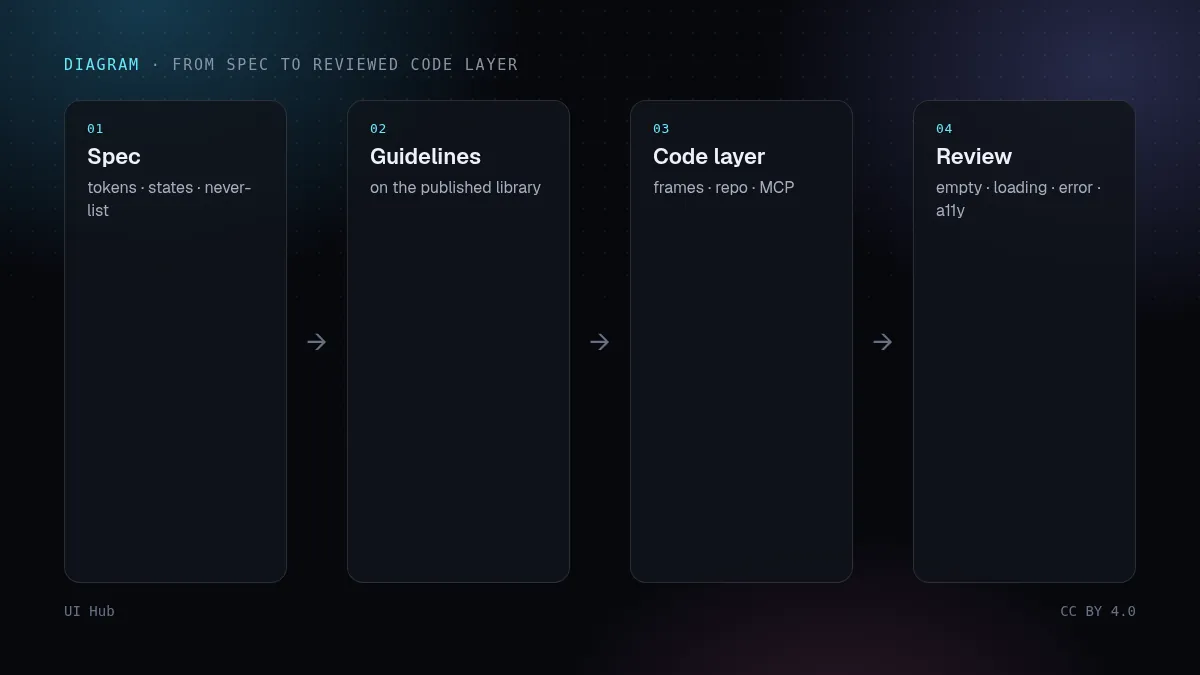
Where UI Hub fits
If you are writing that guideline file or Spec from scratch, start from the design skills and agent guides already collected on UI Hub: filter the resource list by skills for SKILL.md-style rule files, and see the Agents guide for the search, pick and verify loop that pairs well with an MCP-connected coding agent. The point is the same whichever canvas you use: give the agent the rules before you ask it for pixels.
2026 年 10 月 15 日,Figma 在班加罗尔的 Config India 上发布了一组更新。表面看是「又多了几个 AI 功能」,但更有用的读法是一个统一的思路:把代码、文字意图和设计系统规则放到同一张画布上,让人和智能体共用一份上下文,而不是在五个标签页之间来回切。Dylan Field 的汇总文章说得很直白:AI 让写代码变便宜,团队开始「边做边想」,但这种 vibe coding 往往是单人游戏——一位客户的原话是「快、快、快……然后变慢」。
发布了什么
- 代码图层(Code layers),所有套餐公开测试。代码图层是一段放在画布上、可交互、真正在运行的原型。可以从零开始(Code 工具或按 B),选中画框后点 Build selection 转换,克隆已连接的 GitHub 仓库,上传本地文件夹,通过 Figma MCP 服务器从编码工具推进来,或用 Chrome 扩展抓取线上页面。队友可以复制一层去试别的方向、评论和标注、直接改代码、让智能体合并两个版本的优点,用 Extract designs 把画面拆回可编辑图层,最后推到分支并开 Pull Request。
- Specs,付费套餐公开测试。一个多人协作的 Markdown 容器,可以是独立文件,也可以放在 Figma Design 与 FigJam 的设计旁边(按 D,或把任意
.md文件拖到画布上)。Spec 可嵌入画框、FigJam 白板和其他画布节点;Figma 智能体能读取并回复评论;GitHub、Hex 等连接器可以把外部上下文拉进来。按 Figma 的说法,把 Spec 链接粘进编码智能体的提示里,Markdown、画框引用、图表、代码图层和 Code Connect 片段都会一起带过去。 - 携带规则与代码的设计系统。挂在已发布组件库上的 Guidelines(公开测试,Professional 及以上)会在有人用该库构建时自动交给智能体。Code sources(封闭测试)把 GitHub 仓库或 npm 包挂到组件库上,让代码图层使用真实组件。集中式设计系统空间(含系统图谱,以及检查缺少描述、交互状态等缺口的 system check)目前仅为预览。
- Figma MCP。Figma 称服务器更快、更省 Token;可以创建代码图层、读写 Specs、生成图片、运行 Weave 工作流,新增
html_to_figma、generate_image等工具,并新增 20 个合作集成(OpenCode、Dia、Junie、Meta Muse 等)。 - Figma Make 接入 Payload。Make 现在会把 Payload(CMS、数据库、认证、API、管理后台)作为原生后端脚手架;Supabase 继续作为第三方连接可用。
为什么重要:三个转变
原型回到多人协作。编码智能体做原型,真正的成本从来不是生成,而是评审。一个运行中的演示链接只给出结果,却藏起了备选方案和推理过程。把几个运行版本并排放在画布上、评论钉在旁边,就恢复了设计团队熟悉的评审循环。分支 + PR 的出口同样关键:原型有了进入代码仓库的路径,而不是推倒重写。
Markdown 终于有了地址。和智能体协作的团队,PRD、AGENTS.md、提示词笔记大多已经是 Markdown,却散落在各自电脑和仓库里,和它们描述的界面毫无关联。Specs 押注的是:需求应该挨着画框、人和智能体都能编辑、并能用一个 URL 交给编码智能体。不管你用不用 Specs,这个模式是对的——一份权威需求,与作品一起版本化。
设计系统变得「智能体可读」。Guidelines 和 Code sources 是这次发布里最不起眼、却影响最大的部分。一个自带该做/不该做规则、并指向真实 npm 包的组件库,会把「请符合我们的设计系统」从一句愿望变成智能体每次都会收到的输入。
我们的看法
AI 辅助界面里最稀缺的输入,仍然是约束文件。这个月的每个工具——从 Claude Design 的设计系统到 Figma 智能体的规范文件——都收敛到同一个结论:生成能力过剩,质量来自关于 Token、状态和「绝不做什么」的简短明确规则。Figma 现在给这些规则提供了原生的存放位置和自动送达智能体的通道。已经写好精炼规范文件的团队会立刻受益;跳过这一步的团队,只会得到更快、看起来很像品牌的噪声。
两点提醒。第一,这些都是分批灰度的测试版,队友之间可能先后看到功能。第二,成本:代码图层消耗 AI 积分,付费套餐里创建和编辑仅在 2026 年 11 月 4 日前免费;Guidelines 会增加上下文,也可能让单次提示更贵。Figma 公布的客户数据(如 Merkle 称迭代快 30%)是厂商发布的案例快照,不是独立基准测试。
本周就能试的做法
- 选一条流程,而不是整个产品。把一条真实流程(注册、结账、设置)从现有画框或轻量原型仓库转成代码图层,再复制一份比较两个方向。
- 在旁边写一份短 Spec。写清要用的 Token、必须存在的状态、内容规则和禁止清单。控制在一屏以内,才会真的被读。
- 给组件库加 Guidelines。把该做/不该做的规则放到已发布组件库上,让所有基于它的智能体提示自动继承。如果你在 Code sources 测试里,挂上产品真正发布的 npm 包。
- 从编码智能体接入 MCP。把 Claude Code、Cursor、Codex 等连到 Figma MCP 服务器,把 Spec 链接粘进提示,让智能体创建或更新代码图层。
- 像审 Pull Request 一样在画布上验收。在任何人说「可以上线」之前,检查空状态、加载、报错、长文本、键盘焦点和对比度,分别看 390px 与 1440px。然后推到分支。
# Spec: 结账 v2
## Token
只用 surface / text-muted / accent;圆角 10;Geist 14/20
## 必须存在的状态
空购物车 · 加载中 · 卡被拒 · 成功 · 超长名称
## 内容
真实价格、真实报错文案;句首大写
## 禁止
文字渐变 · emoji 图标 · 只有占位符没有标签 · 裸 hex 色值
## 完成标准
390 + 1440 · 亮色 + 暗色 · 焦点可见 · AA 对比度UI Hub 能帮什么
如果你要从零写这份规范文件或 Spec,可以从 UI Hub 已收集的设计技能和智能体指南起步:在资源列表里按 skills 筛选 SKILL.md 风格的规则文件,再看 Agent 指南 里「搜索、挑选、验证」的循环,它和接入 MCP 的编码智能体很搭。不管用哪张画布,道理都一样:先把规则交给智能体,再让它出像素。
On 15 October 2026, at Config India in Bengaluru, Figma shipped a set of updates that are easy to read as “more AI features” and more useful to read as a single idea: put the code, the written intent and the design-system rules on the same canvas, so people and agents work from one context instead of five tabs. Dylan Field’s recap post frames the problem bluntly. AI made code cheap, so teams “build to think”, but that vibe-coding loop is usually single-player; one customer is quoted describing it as “fast, fast, fast… then slow”.
What launched
- Code layers, open beta on all plans. A code layer is a running, interactive prototype that sits on the canvas. You can start one from scratch (Code tool or B), convert selected frames with Build selection, clone a connected GitHub repo, upload a local folder, push a prototype in from your coding tool through the Figma MCP server, or capture a live page with the Chrome extension. Teammates can duplicate a layer to try another direction, comment and annotate it, edit the code, ask the agent to merge the best parts of two versions, pull screens back out with Extract designs, and push to a branch and open a pull request.
- Specs, open beta on paid plans. A multiplayer Markdown container that lives as its own file or next to designs in Figma Design and FigJam (press D, or drop any
.mdfile on the canvas). A spec can embed frames, FigJam boards and other canvas nodes, the Figma agent can read and reply to comments, and connectors such as GitHub and Hex can pull outside context in. Paste a spec link into a coding agent’s prompt and, according to Figma, the Markdown, frame references, diagrams, code layers and Code Connect snippets travel with it. - Design systems that carry rules and code. Guidelines attached to published libraries (open beta, Professional and above) are handed to the agent automatically whenever someone builds with that library. Code sources (closed beta) attach a GitHub repo or npm package to a library so code layers pull from real components. A centralised design-system space with a system map and a “system check” for gaps such as missing descriptions or interactive states is preview only.
- Figma MCP. Figma says the server is now faster and uses fewer tokens; it can create code layers, read and write Specs, generate images and run Weave workflows, and adds tools such as
html_to_figmaandgenerate_image, plus 20 new partner integrations (OpenCode, Dia, Junie, Meta Muse and others). - Payload in Figma Make. Make now scaffolds a Payload backend (CMS, database, auth, APIs, admin panel) as its native backend; Supabase stays available as a third-party connection.
Why it matters: three shifts
Prototypes go back to multiplayer. The real cost of coding-agent prototypes has not been generation; it has been review. A link to a running demo shows the result but hides the alternatives and the reasoning. Putting several running versions side by side on a canvas, with comments pinned to them, restores the critique loop design teams already know. The branch-and-PR exit matters too: the prototype has a route into the repo rather than being rebuilt.
Markdown finally gets an address. Most teams working with agents already keep PRDs, AGENTS.md files and prompt notes in Markdown, scattered across laptops and repos with no link to the screens they describe. Specs is Figma’s bet that the brief should sit beside the frames, be editable by both humans and agents, and be passable to a coding agent by URL. Whether or not you adopt Specs, the pattern is right: one canonical brief, versioned with the work.
Design systems become agent-readable. Guidelines and code sources are the most consequential part of the launch and the least flashy. A library that ships its own do/don’t rules and points at the real npm package turns “please match our design system” from a hope into an input the agent receives every time.
Our take
The scarce input in AI-assisted UI is still the constraint file. Every tool this month, from Claude Design’s design systems to the Figma agent’s guideline files, has converged on the same lesson: generation is abundant, and quality comes from short, explicit rules about tokens, states and what never to do. Figma is now giving those rules a native place to live and an automatic route to the agent. Teams that already wrote a tight guideline file will see the benefit immediately; teams that skipped it will get faster, on-brand-looking noise.
Two caveats. First, these are betas with staggered rollouts, so features may appear for one teammate before another. Second, cost: code layers use AI credits, free for creating and editing on paid plans only until 4 November 2026, and guidelines can make a prompt more expensive because they add context. Figma’s customer numbers (for example, Merkle reporting 30% faster iteration) are vendor-published snapshots, not independent benchmarks.
How to try it this week
- Pick one flow, not a product. Convert a single real flow (sign-up, checkout, settings) into a code layer from existing frames or a lightweight prototype repo. Duplicate it once to compare two directions.
- Write a short Spec next to it. Tokens to use, states that must exist, content rules and a never-list. Keep it to one screen of text so it is actually read.
- Add guidelines to the library. Move your do/don’t pairs onto the published library so every agent prompt against it inherits them. If you are in the code-sources beta, attach the npm package your product really ships.
- Wire MCP from your coding agent. Connect Claude Code, Cursor, Codex or similar to the Figma MCP server, paste the spec link into the prompt, and let the agent create or update the code layer.
- Review on canvas like a pull request. Check empty, loading and error states, long text, keyboard focus and contrast, at 390px and 1440px, before anyone says “ship it”. Then push to a branch.
# Spec: Checkout v2
## Tokens
surface / text-muted / accent only; radius 10; Geist 14/20
## States (must exist)
empty cart · loading · card declined · success · long names
## Content
real prices, real error copy; sentence case
## Never
text gradients · emoji icons · placeholder-only labels · raw hex
## Done when
390 + 1440 · light + dark · focus visible · AA contrastWhere UI Hub fits
If you are writing that guideline file or Spec from scratch, start from the design skills and agent guides already collected on UI Hub: filter the resource list by skills for SKILL.md-style rule files, and see the Agents guide for the search, pick and verify loop that pairs well with an MCP-connected coding agent. The point is the same whichever canvas you use: give the agent the rules before you ask it for pixels.
AI 提示词AI 提示詞AI promptAIプロンプトAI 프롬프트Prompt AIPrompt cho AIPrompt IAPrompt de IAKI-Prompt
复制给 Claude、Cursor、v0 等 AI 助手,让它按本文的方法处理你的项目。尖括号里的内容换成你自己的。複製給 Claude、Cursor、v0 等 AI 助手,讓它按本文的方法處理你的專案。尖括號裡的內容換成你自己的。Paste this into Claude, Cursor, v0 or another assistant to apply this post to your own project. Replace the parts in angle brackets.Claude・Cursor・v0 などのAIアシスタントに貼り付けると、この記事の方法をあなたのプロジェクトに適用できます。山括弧の部分は自分の内容に置き換えてください。Claude, Cursor, v0 같은 AI 도우미에 붙여 넣으면 이 글의 방법을 내 프로젝트에 적용할 수 있습니다. 꺾쇠괄호 안은 내 내용으로 바꾸세요.Tampal ke Claude, Cursor, v0 atau pembantu lain untuk menggunakan kaedah artikel ini pada projek anda. Gantikan bahagian dalam kurungan sudut.Dán vào Claude, Cursor, v0 hoặc trợ lý khác để áp dụng bài này cho dự án của bạn. Thay phần trong dấu ngoặc nhọn bằng nội dung của bạn.Collez-le dans Claude, Cursor, v0 ou un autre assistant pour appliquer cet article à votre projet. Remplacez les parties entre chevrons.Pégalo en Claude, Cursor, v0 u otro asistente para aplicar este artículo a tu proyecto. Sustituye lo que está entre corchetes angulares.In Claude, Cursor, v0 oder einen anderen Assistenten einfügen, um diesen Beitrag auf dein Projekt anzuwenden. Teile in spitzen Klammern ersetzen.
你是一名资深 UI 工程师。请把文章《Figma 代码图层与 Specs:画布重新成为共享上下文》(https://ui.incidental.site/blog/figma-code-layers-and-specs/)的方法用到我的项目上。
核心观点:在 Config India(2026-10-15)上,Figma 让代码图层进入公开测试,推出把 Markdown 放上画布的 Specs,并让组件库携带规范与代码源。给界面构建者的结论:智能体缺的不是生成器,而是约束文件。
步骤:
1. 读文章,把建议整理成一份具体、可检查的编号清单。
2. 用这份清单检查 <我的页面 / 组件 / 仓库>,每条标注通过或不通过,并写明文件和行号。
3. 用我现有的 token 和组件,小批量修复不通过的项。不要编造 API,以文章链接的官方文档为准。
4. 最后列出待确认的问题和你无法核实的内容。
你是一名資深 UI 工程師。請把文章《Figma 程式碼圖層與 Specs:畫布重新成為共享脈絡》(https://ui.incidental.site/blog/figma-code-layers-and-specs/)的方法用到我的專案上。
核心觀點:在 Config India(2026-10-15)上,Figma 讓程式碼圖層進入公開測試,推出把 Markdown 放上畫布的 Specs,並讓元件庫攜帶規範與程式碼來源。給介面建構者的結論:智慧體缺的不是產生器,而是約束檔案。
步驟:
1. 讀文章,把建議整理成一份具體、可檢查的編號清單。
2. 用這份清單檢查 <我的頁面 / 元件 / 儲存庫>,每條標註通過或不通過,並寫明檔案和行號。
3. 用我現有的 token 和元件,小批量修復不通過的項目。不要編造 API,以文章連結的官方文件為準。
4. 最後列出待確認的問題和你無法核實的內容。You are a senior UI engineer. Apply the article “Figma code layers and Specs: the canvas becomes the shared context again” (https://ui.incidental.site/blog/figma-code-layers-and-specs/) to my project.
Key idea: At Config India (15 Oct 2026) Figma moved code layers into open beta, launched Specs as a Markdown home on the canvas, and let libraries carry guidelines and code sources. The lesson for UI builders: agents are short of constraint files, not generators.
Steps:
1. Read the article and turn its advice into a numbered checklist of concrete, checkable rules.
2. Audit <my page / component / repo> against that checklist; mark each rule PASS or FAIL with file and line.
3. Fix the FAIL items in small batches, using my existing tokens and components. Do not invent APIs; follow the official docs the article links to.
4. Finish with a short list of open questions and anything you could not verify.あなたはシニアUIエンジニアです。記事「Figmaのコードレイヤーと Specs:キャンバスが再び共有コンテキストに」(https://ui.incidental.site/blog/figma-code-layers-and-specs/)の方法を私のプロジェクトに適用してください。
要点:Config India(2026-10-15)でFigmaはコードレイヤーをオープンベータにし、Markdownをキャンバスに置くSpecsを公開、ライブラリにガイドラインとコードソースを持たせた。UI制作者への教訓:エージェントに足りないのは生成器ではなく制約ファイルだ。
手順:
1. 記事を読み、助言を具体的で確認可能な番号付きチェックリストにする。
2. そのチェックリストで <私のページ / コンポーネント / リポジトリ> を監査し、各項目を合格/不合格で示し、ファイルと行番号を書く。
3. 不合格の項目を、既存のトークンとコンポーネントを使って少しずつ修正する。APIを捏造せず、記事がリンクする公式ドキュメントに従う。
4. 最後に未解決の質問と検証できなかった点を挙げる。당신은 시니어 UI 엔지니어입니다. 글 “Figma 코드 레이어와 Specs: 캔버스가 다시 공유 컨텍스트가 되다”(https://ui.incidental.site/blog/figma-code-layers-and-specs/)의 방법을 내 프로젝트에 적용해 주세요.
핵심: Config India(2026-10-15)에서 Figma는 코드 레이어를 오픈 베타로 전환하고, Markdown을 캔버스에 두는 Specs를 출시했으며, 라이브러리에 가이드라인과 코드 소스를 붙였다. UI 제작자에게 주는 교훈: 에이전트에게 부족한 것은 생성기가 아니라 제약 파일이다.
단계:
1. 글을 읽고 조언을 구체적이고 확인 가능한 번호 목록으로 정리한다.
2. 그 목록으로 <내 페이지 / 컴포넌트 / 저장소>를 점검하고, 항목마다 통과/실패와 파일·줄 번호를 적는다.
3. 실패 항목을 기존 토큰과 컴포넌트로 조금씩 고친다. API를 지어내지 말고 글에 링크된 공식 문서를 따른다.
4. 마지막으로 남은 질문과 확인하지 못한 내용을 정리한다.Anda jurutera UI kanan. Gunakan kaedah artikel “Lapisan kod dan Specs Figma: kanvas kembali menjadi konteks bersama” (https://ui.incidental.site/blog/figma-code-layers-and-specs/) pada projek saya.
Idea utama: Di Config India (15 Okt 2026) Figma membawa lapisan kod ke beta terbuka, melancarkan Specs sebagai rumah Markdown di kanvas, dan membenarkan pustaka membawa garis panduan serta sumber kod. Pengajaran: ejen kekurangan fail kekangan, bukan penjana.
Langkah:
1. Baca artikel dan jadikan nasihatnya senarai semak bernombor yang konkrit dan boleh disemak.
2. Audit <halaman / komponen / repo saya> dengan senarai itu; tandakan setiap peraturan LULUS atau GAGAL dengan fail dan baris.
3. Baiki item GAGAL sedikit demi sedikit menggunakan token dan komponen sedia ada. Jangan reka API; ikut dokumen rasmi yang dipautkan artikel.
4. Akhiri dengan soalan terbuka dan perkara yang tidak dapat disahkan.Bạn là kỹ sư UI cấp cao. Hãy áp dụng bài viết “Code layers và Specs của Figma: canvas lại là ngữ cảnh chung” (https://ui.incidental.site/blog/figma-code-layers-and-specs/) cho dự án của tôi.
Ý chính: Tại Config India (15/10/2026), Figma đưa code layers vào beta mở, ra mắt Specs làm nơi đặt Markdown trên canvas, và cho thư viện mang theo guidelines cùng code sources. Bài học: agent thiếu file ràng buộc, không thiếu trình sinh.
Các bước:
1. Đọc bài và biến lời khuyên thành danh sách kiểm tra đánh số, cụ thể, kiểm chứng được.
2. Rà soát <trang / component / repo của tôi> theo danh sách đó; ghi ĐẠT hoặc KHÔNG ĐẠT kèm tệp và dòng.
3. Sửa các mục KHÔNG ĐẠT theo từng đợt nhỏ, dùng token và component sẵn có. Không bịa API; làm theo tài liệu chính thức mà bài viết dẫn tới.
4. Kết thúc bằng các câu hỏi còn mở và những điểm chưa xác minh được.Tu es ingénieur UI senior. Applique l’article « Code layers et Specs dans Figma : le canevas redevient le contexte partagé » (https://ui.incidental.site/blog/figma-code-layers-and-specs/) à mon projet.
Idée clé : À Config India (15 oct. 2026), Figma passe les code layers en bêta ouverte, lance Specs pour le Markdown sur le canevas et laisse les bibliothèques porter guidelines et sources de code. Leçon : les agents manquent de fichiers de contraintes, pas de générateurs.
Étapes :
1. Lis l’article et transforme ses conseils en une liste numérotée de règles concrètes et vérifiables.
2. Audite <ma page / mon composant / mon dépôt> avec cette liste ; indique OK ou KO pour chaque règle, avec fichier et ligne.
3. Corrige les points KO par petits lots, avec mes tokens et composants existants. N’invente pas d’API ; suis la documentation officielle citée par l’article.
4. Termine par les questions ouvertes et ce que tu n’as pas pu vérifier.Eres un ingeniero de UI sénior. Aplica el artículo “Code layers y Specs en Figma: el lienzo vuelve a ser el contexto compartido” (https://ui.incidental.site/blog/figma-code-layers-and-specs/) a mi proyecto.
Idea clave: En Config India (15 oct 2026) Figma llevó los code layers a beta abierta, lanzó Specs como hogar del Markdown en el lienzo y dejó que las bibliotecas lleven guidelines y fuentes de código. Lección: a los agentes les faltan archivos de restricciones, no generadores.
Pasos:
1. Lee el artículo y convierte sus consejos en una lista numerada de reglas concretas y comprobables.
2. Audita <mi página / componente / repositorio> con esa lista; marca cada regla como CUMPLE o NO CUMPLE con archivo y línea.
3. Corrige los puntos que no cumplen en lotes pequeños, usando mis tokens y componentes actuales. No inventes APIs; sigue la documentación oficial que enlaza el artículo.
4. Termina con las preguntas abiertas y lo que no pudiste verificar.Du bist Senior-UI-Engineer. Wende den Artikel „Figma Code Layers und Specs: Die Canvas wird wieder zum gemeinsamen Kontext“ (https://ui.incidental.site/blog/figma-code-layers-and-specs/) auf mein Projekt an.
Kernidee: Auf der Config India (15. Okt. 2026) brachte Figma Code Layers in die offene Beta, startete Specs als Markdown-Ort auf der Canvas und ließ Bibliotheken Guidelines und Code-Quellen tragen. Die Lehre: Agenten fehlen Constraint-Dateien, nicht Generatoren.
Schritte:
1. Lies den Artikel und mach aus den Empfehlungen eine nummerierte Liste konkreter, prüfbarer Regeln.
2. Prüfe <meine Seite / Komponente / mein Repo> anhand dieser Liste; markiere jede Regel mit OK oder FEHLT, mit Datei und Zeile.
3. Behebe die fehlenden Punkte in kleinen Schritten mit meinen vorhandenen Tokens und Komponenten. Erfinde keine APIs; folge der offiziellen Doku, die der Artikel verlinkt.
4. Schließe mit offenen Fragen und dem, was du nicht prüfen konntest.引用来源引用來源References参考文献참고 자료RujukanNguồn tham khảoRéférencesReferenciasQuellen
- Build by design: New workflows for new ways of building — Figma (Dylan Field)
- Design together with code layers on the canvas — Figma
- Introducing Specs: Markdown as a medium — Figma
- What's new from Config India 2026 — Figma Help Center
- Code layers in Figma Design — Figma Help Center
- Guide to Specs in Figma — Figma Help Center
- Guide to the Figma MCP server — Figma Help Center
- Here's everything from Config India 2026 — Figma Forum
- Figma deepens investment in India with largest international Config yet — Figma
相关文章相關文章Related posts関連記事관련 글Artikel berkaitanBài liên quanArticles liésArtículos relacionadosÄhnliche Beiträge
Figma Make 与 Figma 智能体:AI 搬上画布Figma Make 與 Figma 智慧體:AI 搬上畫布Figma Make and the Figma agent: AI moves onto the canvasFigma MakeとFigmaエージェント:AIがキャンバスへFigma Make와 Figma 에이전트: AI가 캔버스로Figma Make dan ejen Figma: AI pindah ke kanvasFigma Make và agent của Figma: AI lên canvasFigma Make et l'agent Figma : l'IA arrive sur le canevasFigma Make y el agente de Figma: la IA llega al lienzoFigma Make und der Figma-Agent: KI zieht auf die Canvas
Figma Make 把提示变成可交互原型;Figma 智能体自 2026-10-06 正式可用,能读取团队规范文件。为什么规范文件才是关键。Figma Make 把提示變成可互動原型;Figma 智慧體自 2026-10-06 正式可用,能讀取團隊規範檔。為什麼規範檔才是關鍵。Figma Make turns prompts into working prototypes; the Figma agent, generally available since 6 Oct 2026, reads team guideline files. Why the guideline file matters most.Figma Makeはプロンプトを動くプロトタイプに。2026/10/6 GAのエージェントはガイドラインを読む。肝はガイドライン。Figma Make는 프롬프트를 프로토타입으로, 2026-10-06 정식 출시된 에이전트는 가이드라인 파일을 읽는다.Figma Make jadikan prompt prototaip; ejen Figma (GA 6 Okt 2026) membaca fail garis panduan pasukan.Figma Make biến prompt thành prototype; agent Figma (GA 6/10/2026) đọc file hướng dẫn của nhóm.Figma Make transforme des prompts en prototypes ; l'agent (GA le 6/10/2026) lit les guides d'équipe.Figma Make convierte prompts en prototipos; el agente (GA 6/10/2026) lee las guías del equipo.Figma Make macht Prompts zu Prototypen; der Agent (GA 6.10.2026) liest Team-Guidelines.
v0 实战:从一句提示到能留下来的 shadcn 代码v0 實戰:從一句提示到能留下來的 shadcn 程式碼v0 in practice: from a prompt to shadcn code you can keepv0実践:プロンプトから残せるshadcnコードへv0 실전: 프롬프트에서 남길 수 있는 shadcn 코드까지v0 secara praktikal: dari prompt ke kod shadcn yang boleh disimpanv0 thực chiến: từ một prompt đến mã shadcn giữ lại đượcv0 en pratique : d'un prompt à du code shadcn qu'on gardev0 en la práctica: de un prompt a código shadcn que puedes conservarv0 in der Praxis: vom Prompt zu shadcn-Code, den man behält
v0 最强的用法是把它当 shadcn/Tailwind 代码生成器,而不是设计神谕。像给工程师写需求一样写提示,然后把代码拉进自己的仓库。v0 最強的用法是把它當 shadcn/Tailwind 程式碼產生器,而不是設計神諭。像給工程師寫需求一樣寫提示,再把程式碼拉進自己的倉庫。v0 is strongest when you treat it as a shadcn/Tailwind code generator, not a design oracle. Brief it like an engineer, then pull the code into your repo.v0はデザインの神託ではなくshadcn/Tailwindのコード生成器として使うと最強。エンジニア向けに指示し、コードを自分のリポジトリへ。v0는 디자인 신탁이 아니라 shadcn/Tailwind 코드 생성기로 쓸 때 가장 강하다. 엔지니어에게 하듯 지시하고 코드를 저장소로 가져오자.v0 paling kuat sebagai penjana kod shadcn/Tailwind. Beri arahan seperti kepada jurutera, kemudian bawa kod ke repo anda.v0 mạnh nhất khi coi là trình sinh mã shadcn/Tailwind. Viết yêu cầu như cho kỹ sư rồi kéo mã về repo.v0 brille comme générateur de code shadcn/Tailwind. Briefez-le comme un ingénieur puis rapatriez le code.v0 rinde mejor como generador de código shadcn/Tailwind. Instrúyelo como a un ingeniero y lleva el código a tu repo.v0 glänzt als shadcn/Tailwind-Codegenerator. Briefen Sie es wie einen Engineer und holen Sie den Code ins Repo.
Lovable 与 Bolt:当「提示生成界面」变成「提示生成应用」Lovable 與 Bolt:當「提示產生介面」變成「提示產生應用」Lovable and Bolt: when prompt-to-UI becomes prompt-to-appLovableとBolt:プロンプトからUIがアプリになるときLovable과 Bolt: 프롬프트-UI가 프롬프트-앱이 될 때Lovable dan Bolt: apabila prompt-ke-UI menjadi prompt-ke-aplLovable và Bolt: khi prompt-to-UI thành prompt-to-appLovable et Bolt : quand le prompt-to-UI devient prompt-to-appLovable y Bolt: cuando prompt-to-UI se vuelve prompt-to-appLovable und Bolt: wenn Prompt-to-UI zu Prompt-to-App wird
两者都能生成完整应用,于是设计质量要和数据、登录、部署抢注意力。如何不让视觉沦为事后补丁。兩者都能產生完整應用,於是設計品質要和資料、登入、部署搶注意力。如何不讓視覺淪為事後補丁。Both tools build whole apps, so design quality now competes with data, auth and deploys for attention. How to keep the look from being an afterthought.どちらもアプリ全体を作るため、デザイン品質はデータや認証と注意を奪い合う。見た目を後回しにしない方法。둘 다 앱 전체를 만들기에 디자인 품질이 데이터·인증·배포와 경쟁한다. 외관을 뒷전으로 두지 않는 법.Kedua-duanya membina apl penuh; reka bentuk bersaing dengan data dan auth. Cara elak visual jadi hal kemudian.Cả hai dựng app hoàn chỉnh nên thiết kế phải tranh chú ý với dữ liệu, đăng nhập. Cách để giao diện không bị bỏ quên.Les deux construisent des apps entières : le design rivalise avec données et auth. Comment ne pas le reléguer.Ambos construyen apps completas: el diseño compite con datos y auth. Cómo evitar que quede para después.Beide bauen ganze Apps – Design konkurriert mit Daten und Auth. So bleibt die Optik keine Nebensache.